
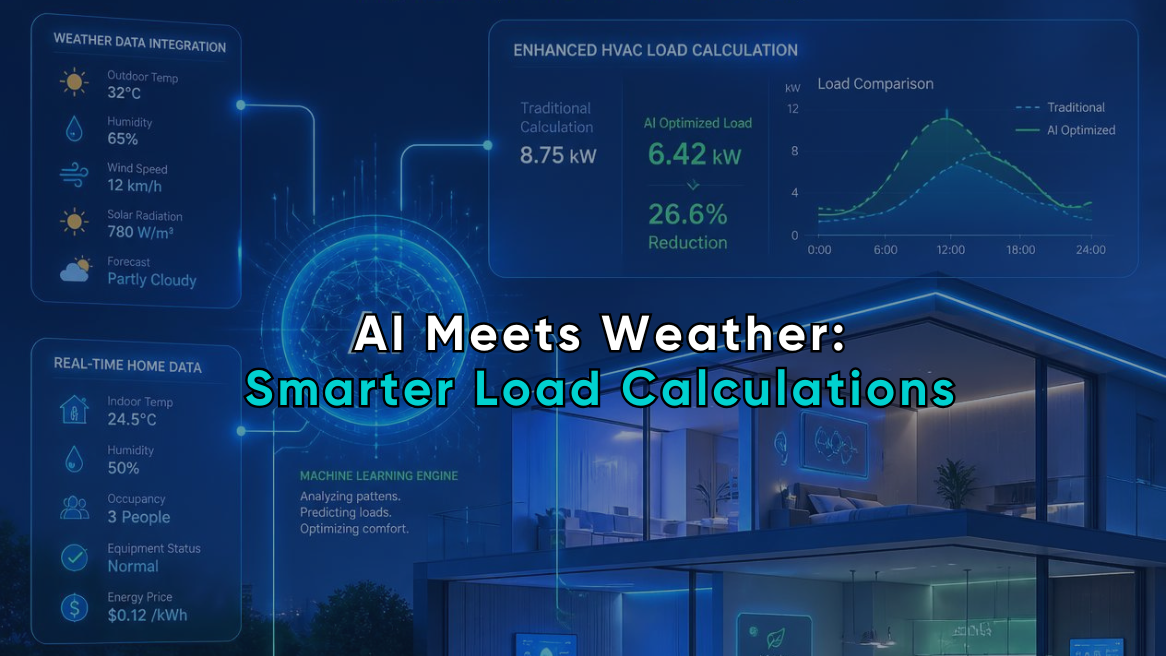
Using AI and Weather Data for More Accurate HVAC Load Calculations
Two homes can have the same square footage, floor plan, and insulation levels and still require different heating and cooling capacities.
The reason may be outside the building.
Temperature extremes, humidity, solar exposure, elevation, wind, and seasonal weather patterns all affect how much heat a structure gains or loses. That makes accurate HVAC load calculation weather data just as important as measurements of walls, windows, ceilings, and infiltration.
Artificial intelligence can make weather-based modeling faster and more detailed. It can select nearby weather stations, compare historical datasets, identify unusual conditions, and flag inputs that do not fit the property or location.
But AI still depends on sound calculation methods. It can’t compensate for inaccurate field measurements, and it shouldn’t size equipment from a weather forecast or a handful of recent temperature readings.
The best approach combines three elements: verified building information, appropriate local climate data, and AI-assisted checks and workflow automation.
Used together, they give contractors a more reliable picture of how a building is likely to perform when outdoor conditions become demanding.
Weather Is Not Just the Outdoor Temperature
Many simplified sizing methods treat climate as a single number: the expected outdoor temperature on a hot or cold day.
A proper load calculation requires more context.
Depending on the calculation and property, relevant weather inputs may include:
- Summer outdoor dry-bulb temperature
- Winter outdoor dry-bulb temperature
- Outdoor humidity or wet-bulb conditions
- Daily temperature range
- Solar intensity
- Wind exposure
- Elevation
- Seasonal temperature patterns
- Local extreme-weather frequency
These factors influence different parts of the load.
Outdoor temperature affects heat transfer through the building envelope. Humidity changes the amount of moisture the cooling system may need to remove. Solar conditions affect heat gain through windows, roofs, and exposed walls. Wind can increase air leakage in a drafty structure.
That is why pulling climate data for the wrong city, or even the wrong local weather station, can skew a load result.
ASHRAE’s Weather Data Center now provides climatic design information for more than 12,000 stations worldwide, reflecting how location-specific weather data has become in modern building analysis.
Climate Data and Current Weather Serve Different Purposes
A common mistake is to assume the latest heat wave or cold snap should determine equipment size. It shouldn’t.
A weather forecast helps contractors prepare for near-term demand and may support system controls. A load calculation is intended to estimate how the building performs under defined outdoor design conditions.
Those are different jobs.
Historical climate data supports sizing
Climate datasets use many years of recorded conditions to describe what is typical or statistically significant for a location.
NOAA’s current U.S. Climate Normals cover the 1991–2020 period. These datasets are updated every decade and provide benchmarks for variables such as temperature, precipitation, and heating and cooling degree days.
Long-term datasets help prevent one unusual season from dominating the calculation.
A record-hot week may expose a comfort problem, but it does not automatically mean every replacement system should be substantially larger.
Forecast data supports operation
Real-time weather and short-term forecasts are more useful for:
- Building control strategies
- Demand management
- Pre-cooling or pre-heating
- Dispatch planning
- Maintenance scheduling
- Predicting near-term service volume
The U.S. Department of Energy describes model-predictive control as an emerging application in which building models use information such as weather forecasts, occupancy, and energy prices to adjust HVAC operation.
That is valuable, but it should not be confused with determining a permanent equipment load from tomorrow’s forecast.
How Weather Data Affects an HVAC Load Calculation
An HVAC load calculation estimates the rate at which heat enters or leaves a building under defined conditions.
The weather input establishes the outdoor side of that calculation.
If the selected winter temperature is too mild, the estimated heating load may be too low. If the summer temperature or humidity assumption is too severe, the cooling load may be overstated.
The calculation must then combine that weather information with the actual building characteristics.
These commonly include:
- Building orientation
- Wall and ceiling assemblies
- Insulation levels
- Window area and performance
- Air leakage
- Floor construction
- Duct location and condition
- Internal heat sources
- Indoor temperature targets
- Shading and solar exposure
Weather is a major input, but it is not the whole model.
The Department of Energy explains that building energy models combine local weather with information about geometry, construction materials, occupancy, schedules, HVAC systems, and controls to calculate thermal loads and energy use.
A weather dataset cannot reveal that half the attic insulation is missing. AI cannot infer the actual window type from the home’s ZIP code with enough confidence to replace an inspection.
Field data still drives the result.
Where AI Weather HVAC Tools Can Improve Accuracy
The most useful AI applications leave the physics of a heat-load calculation intact and improve the data selection, validation, and interpretation around it.
AI can choose more relevant weather records
A basic software program may assign climate data according to the nearest major city.
That can be inaccurate when a project is located:
- At a much higher elevation
- Near a coastline
- In an urban heat island
- In a mountain valley
- Far from the selected airport
- On the edge of two climate regions
An AI-assisted system can compare multiple stations using distance, elevation, record completeness, terrain, and other location characteristics.
It may then recommend the most representative source rather than simply selecting the geographically closest station.
The final selection should remain visible to the user. Contractors need to know which weather station and design values were applied.
AI can detect mismatched location data
Address errors are easy to make.
A mistyped ZIP code, incorrect state abbreviation, or automatically selected municipality can attach the wrong weather profile to the project.
AI can flag inconsistencies between:
- The street address and ZIP code
- The ZIP code and elevation
- The selected weather station and project coordinates
- Local climate conditions and entered outdoor values
- The location and expected heating or cooling pattern
These checks are simple, but they can prevent a large error from entering the calculation unnoticed.
AI can identify unusual combinations of inputs
Suppose a calculation shows a high cooling load for a modest home in a relatively mild climate.
That result might be correct. The property could have extensive west-facing glass, poor attic insulation, significant leakage, or ducts in a hot unconditioned space.
It could also indicate a data-entry problem.
AI can compare the result against the rest of the model and ask useful questions:
- Is the window area unusually high?
- Was the ceiling insulation entered correctly?
- Does the selected weather station match the address?
- Was an indoor or outdoor temperature entered in the wrong field?
- Is the calculated load far outside the range of similar local properties?
This is where HVAC data modeling becomes practical. AI can use patterns from previous calculations to highlight results that deserve review.
A flag isn’t a correction; it just tells the contractor where to look.
AI can process larger climate datasets
Traditional residential load calculations usually rely on defined design conditions. More advanced analysis may use hourly weather files to model how the building behaves across an entire year.
These weather files can include:
- Hourly temperature
- Humidity
- Solar radiation
- Wind speed and direction
- Atmospheric conditions
- Seasonal variation
Whole-building simulation tools combine hourly or sub-hourly weather inputs with building characteristics to evaluate loads, comfort, controls, and energy use over time.
AI can help contractors and analysts work with these larger datasets by:
- Finding missing or corrupted records
- Comparing multiple weather files
- Grouping similar operating conditions
- Identifying peak-load periods
- Summarizing annual performance
- Detecting sensitivity to specific weather variables
This can be useful for energy audits, retrofit comparisons, unusual buildings, and projects where annual performance matters as much as peak capacity.
Can Future Climate Data Improve Weather-Based HVAC Sizing?
Historical weather remains the standard basis for many building calculations, but it has a limitation: equipment and buildings may remain in use for decades.
The climate during that service life may not look exactly like the period used to create the historical dataset.
The Department of Energy has noted that widely used weather files are based on historical records and may not fully represent the conditions a building experiences over a 50-year life. DOE research has therefore explored future and extreme-weather datasets for building modeling.
This doesn’t mean contractors should bolt an arbitrary “climate-change factor” onto every load, which would just be another form of guesswork.
A more defensible approach is scenario analysis.
For certain projects, software could compare:
- Current design conditions
- A recent historical weather period
- An unusually hot or cold year
- A carefully sourced future climate scenario
The comparison may show whether the building is sensitive to small weather changes.
That information can support decisions about:
- Envelope improvements
- Window upgrades
- Shading
- Moisture control
- Backup heat
- Equipment staging
- Variable-capacity systems
- Future retrofit planning
The output should be presented as a scenario, not as a guaranteed prediction.
AI Can Also Make Bad Weather Data More Convincing
AI creates a particular risk: it can explain an incorrect result extremely well.
An automated report may describe climate conditions, system performance, and recommended capacity in polished language. That presentation can make the analysis look more reliable than the underlying inputs deserve.
Watch for these problems.
Using the nearest station without checking it
The nearest airport may have a different elevation, exposure, or microclimate.
Treating one extreme event as the new baseline
A record-breaking season is relevant context, but it is not a complete climate dataset.
Mixing weather files from different periods
A model may use temperature records from one period, humidity assumptions from another, and solar data from a third without clearly explaining the mismatch.
Hiding the source data
A contractor should be able to see:
- The weather station
- The data period
- The selected outdoor conditions
- Any adjustments made by the software
- Whether the values were entered manually or selected automatically
Letting AI change technical inputs without approval
AI may recommend another station or identify a questionable value. It should not silently change the project’s climate inputs.
Transparency matters more than automation here.
A Better Workflow for Climate-Based HVAC Design
Contractors can use weather data and AI without turning the calculation into a black box.
A reliable workflow looks like this:
1. Confirm the property location
Verify the complete address, coordinates where available, elevation, and relevant site conditions.
2. Select an appropriate weather source
Review the selected station rather than accepting the default automatically. Consider proximity, elevation, terrain, and record quality.
3. Inspect the building
Collect actual information about the envelope, windows, insulation, leakage, ducts, orientation, and internal conditions.
4. Run the load calculation
Use controlled calculation software that produces a repeatable report from the entered building and climate data.
5. Apply AI-based quality checks
Use AI to flag missing fields, inconsistent values, unusual loads, or possible station mismatches.
6. Review flagged conditions
A trained person should determine whether the result reflects an error or a genuine feature of the property.
7. Compare scenarios when useful
For home-performance or retrofit work, compare envelope changes, weather conditions, or operating assumptions instead of treating one result as the only possible future.
8. Document the inputs
The report should make the location, weather assumptions, building inputs, and major limitations clear.
Weather-Based HVAC Sizing Is Only as Good as the Building Model
Better weather data can improve a load calculation. It cannot rescue a poor building survey.
A highly detailed hourly weather file paired with guessed insulation levels is still a weak model. So is an AI-enhanced report built from inaccurate window dimensions or an incorrect duct location.
Contractors should prioritize accuracy in this order:
- Verify the building.
- Verify the location.
- Select appropriate weather data.
- Run the calculation.
- Use AI to check and communicate the result.
The sequence matters.
AI belongs after reliable inputs, not in place of them.
How EDS Supports More Reliable Load and Weather Workflows
Energy Design Systems (EDS) provides cloud-based HVAC load calculation tools that help contractors turn building measurements and climate information into structured heat-load reports.
The value of a structured platform is consistency. Instead of relying on a rule of thumb, contractors can document the building envelope, account for local conditions, and produce a report that can be reviewed and shared.
AI-assisted features can strengthen that process by helping users:
- Catch incomplete project information
- Identify potentially inconsistent inputs
- Reduce repetitive data entry
- Organize project records
- Explain calculation results to homeowners
- Connect load and home-audit information to broader sales workflows
Rather than replacing contractor judgment or designing a complete HVAC system on their own, EDS tools provide calculations and reports that give the contractor a stronger basis for the next decision.
The EDS HVAC Home Auditor can also help connect building-performance observations with homeowner-facing reports. That is useful when the load is being affected by issues such as insulation, leakage, windows, or other envelope conditions.
Weather data tells you what the building must withstand.
Field data tells you how the building responds.
AI can help connect the two, but the most accurate load calculation still begins with a contractor who verifies both.
Related posts
-
![HVAC Software]()
HVAC Software – Reasons That Makes It a Worthy Investment For HVAC Service Providers
You know the HVAC industry and you are well-aware of what it takes to deliver exceptional field services. Heat and cooling load calculation is a fundamental service every HVAC designer and consultant should provide to help homeowners get the appropriate HVAC system solution. An appropriately sized heat and cooling system not just provides the right-sized…
-
![Cooling Load Calculation]()
Important factors of Cooling Load Calculation and how it is calculated
Every home needs a perfect amount of cooling to make the atmosphere comfortable. However, achieving a comfortable level is entirely dependent on having the right-sized home air conditioning unit. But how do you make sure your cooling system is correctly sized? Well, you can get help from the professionals providing cooling load calculation services. Also,…

